Chapter 1: Heterogeneous Computing & GPGPU
1.1 What is a Heterogeneous System?
A homogeneous computing system has only one type of processor — a multi-core CPU, for example. Every core can run any program at full capability.
A heterogeneous system combines different types of processors on the same machine, each optimised for different kinds of work:
| Component | Optimised for | Typical count |
|---|---|---|
| CPU | Complex sequential logic, branching, OS tasks | 4 – 32 cores |
| GPU | Simple arithmetic on huge data sets | 1 000 – 10 000+ shader cores |
| NPU / TPU | Neural network inference | 1 |
| DSP | Real-time signal processing | 1 – 4 |
Modern smartphones, laptops, and servers all contain at least a CPU and a GPU. Our laptop’s GPU is not just for games — it can accelerate scientific computation, image processing, and machine learning.
GPGPU = General-Purpose computing on Graphics Processing Units
Using the GPU for calculations that have nothing to do with rendering graphics.
1.2 CPU Architecture
A modern desktop CPU has a small number of powerful, complex cores.
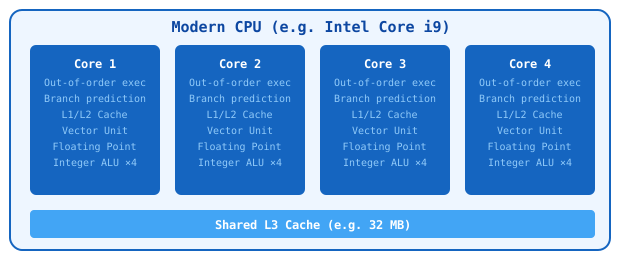
Key CPU characteristics:
- Each core can run a completely different program with different data
- Large caches reduce memory access latency
- Branch prediction allows speculative execution
- Cores run at 3–5 GHz
- Typical total: 4 to 32 cores
1.3 GPU Architecture
A GPU looks completely different. It has thousands of simple, small cores (called shader processors or compute units).
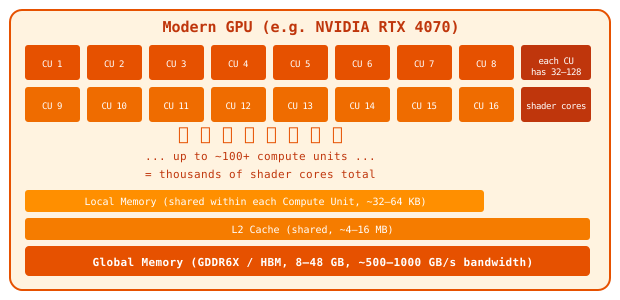
Key GPU characteristics:
- Cores are simple: little branching logic, small cache
- All cores run the same instruction on different data simultaneously (SIMT)
- Huge memory bandwidth (10× more than CPU)
- Runs at 1–3 GHz, but compensates with sheer core count
- Typical total: 1,000 – 10,000+ shader cores
1.4 CPU vs GPU — The Mental Model
Think of it this way:
CPU = a few expert surgeons who can each handle any complex operation independently.
GPU = a huge army of simple workers who all do the same job at the same time.
The CPU is best when tasks are complex, sequential, and different from each other (e.g., running your operating system, compiling code, handling network packets).
The GPU is best when tasks are simple, independent, and identical applied to massive amounts of data (e.g., computing every pixel of an image, training a neural network, simulating a million particles).
1.5 Data Parallelism
The fundamental idea behind GPGPU is data parallelism: performing the same operation on many data items simultaneously.
Example — adding two arrays element by element:
Sequential (CPU):           Parallel (GPU):
for i in 0..N:              all i at once:
  C[i] = A[i] + B[i]         C[i] = A[i] + B[i]   ← each "thread" handles one i
On a CPU with 8 cores, you can do 8 additions at once.
On a GPU with 4,096 cores, you can do 4,096 additions at once.
For 1,000,000 elements: GPU finishes ~500× faster (in the ideal case).
Problems well-suited for GPU:
- Image / video processing (each pixel is independent)
- Physical simulation (each particle is independent)
- Matrix multiplication (each output element is independent)
- Cryptography, compression, sorting
Problems poorly suited for GPU:
- Sequential algorithms (each step depends on the previous)
- Heavy branching (cores must take the same code path)
- Irregular memory access patterns
1.6 Amdahl’s Law
Not all code can be parallelised. Amdahl’s Law gives the theoretical maximum speedup:
Where:
- P = fraction of code that can run in parallel (0.0–1.0)
- N = number of parallel processors
- S = resulting speedup factor
Example: If 90% of your program is parallelisable and you have a GPU with 1,000 cores:
Even with infinite cores, the maximum speedup is 10× (limited by the sequential 10%).
Lesson: Profile first. Only parallelise the bottleneck.
1.7 What is OpenCL?
OpenCL (Open Computing Language) is an open standard for writing programs that run across heterogeneous platforms — CPUs, GPUs, FPGAs, and DSPs — from any vendor.
It was developed by the Khronos Group (same group behind OpenGL and Vulkan).
graph TD
    A["Your C# Host Program"] --> B["OpenCL API  (Silk.NET.OpenCL)"]
    B --> C["OpenCL Platform – NVIDIA"]
    B --> D["OpenCL Platform – AMD"]
    B --> E["OpenCL Platform – Intel"]
    B --> F["OpenCL Platform – Apple"]
    C --> G["NVIDIA GPU"]
    D --> H["AMD GPU"]
    D --> I["AMD CPU"]
    E --> J["Intel GPU"]
    E --> K["Intel CPU"]
    F --> L["Apple Silicon GPU"]
OpenCL vs CUDA
| Feature | OpenCL | CUDA |
|---|---|---|
| Vendor | Khronos (open standard) | NVIDIA (proprietary) |
| Hardware support | Any GPU/CPU with an OpenCL driver | NVIDIA GPUs only |
| Performance | Slightly lower on NVIDIA | Optimal on NVIDIA |
| Portability | High | Low |
| Language | OpenCL C (C99 subset) | CUDA C++ |
We use OpenCL because it works on any hardware, whether that’s NVIDIA, AMD, Intel, or Apple Silicon.
How Silk.NET.OpenCL fits in
The OpenCL API is a C library — it was designed for C programs, not C#. Silk.NET.OpenCL is a thin, auto-generated C# wrapper that makes every OpenCL function available as a C# method.
Under the hood it still calls the native C API, which is why we need unsafe code in some places (covered in Chapter 2).
OpenCL C API           Silk.NET wrapper              Your C# code
─────────────          ─────────────────             ────────────
clGetPlatformIDs()  ←→  cl.GetPlatformIDs(...)   ←   Program.cs
clCreateBuffer()    ←→  cl.CreateBuffer(...)      ←   Program.cs
clEnqueueNDRange()  ←→  cl.EnqueueNdrangeKernel() ←   Program.cs
1.8 The Big Picture
Here is the overall flow of a GPGPU program:
flowchart LR
    A["1\. Write kernel<br>(OpenCL C)"] --> B["2\. Compile<br>kernel<br>at runtime"]
    B --> C["3\. Upload data<br>to GPU memory"]
    C --> D["4\. Launch thousands<br>of threads"]
    D --> E["5\. Download result<br>from GPU memory"]
    E --> F["6\. Use result<br>in C#"]

    style A fill:#E3F2FD
    style B fill:#BBDEFB
    style C fill:#90CAF9
    style D fill:#42A5F5,color:#fff
    style E fill:#1E88E5,color:#fff
    style F fill:#1565C0,color:#fff
Each step maps to specific OpenCL API calls, which we explore in Chapter 03_OpenCL_Model and the sample walkthroughs.