Chapter 3: The OpenCL Programming Model
This chapter explains the abstract model that OpenCL uses. Once you understand the model, all the API calls in the samples will make sense.
3.1 The Platform Model
OpenCL organises hardware into a hierarchy:
graph TD
    Host["Host (your C# program on the CPU)"]
    Host --> P1["Platform<br>(e.g. NVIDIA OpenCL Runtime)"]
    Host --> P2["Platform<br>(e.g. Intel OpenCL Runtime)"]
    P1 --> D1["Device: NVIDIA RTX 4070<br>(GPU)"]
    P2 --> D2["Device: Intel Iris Xe<br>(GPU)"]
    P2 --> D3["Device: Intel Core i9<br>(CPU)"]

    style Host fill:#1565C0,color:#fff
    style P1 fill:#2196F3,color:#fff
    style P2 fill:#2196F3,color:#fff
    style D1 fill:#43A047,color:#fff
    style D2 fill:#43A047,color:#fff
    style D3 fill:#E65100,color:#fff
| Concept | Meaning | C# type |
|---|---|---|
| Host | Your C# program running on the CPU | — |
| Platform | A vendor’s OpenCL runtime (driver) | nint (handle) |
| Device | A physical processor (GPU, CPU, accelerator) | nint (handle) |
Discovering platforms and devices is what Sample 01 does — it walks this hierarchy and prints every device it finds.
3.2 The Runtime Objects
Before you can run a kernel you need to create several runtime objects:
graph LR
    Platform["Platform"] --> Context
    Device["Device"] --> Context
    Context["Context"] --> Queue["Command Queue"]
    Context --> Buffer["Buffer (GPU memory)"]
    Context --> Program["Program (compiled kernel)"]
    Program --> Kernel["Kernel (callable function)"]

    style Context fill:#7B1FA2,color:#fff
    style Queue fill:#1565C0,color:#fff
    style Buffer fill:#E65100,color:#fff
    style Program fill:#2E7D32,color:#fff
    style Kernel fill:#2E7D32,color:#fff
| Object | Created by | Purpose |
|---|---|---|
| Context | CreateContext | Shared environment linking host and one or more devices. All buffers and programs live inside a context. |
| Command Queue | CreateCommandQueue | An ordered channel for sending commands (kernel launches, buffer copies) to one device. |
| Buffer | CreateBuffer | A region of memory on the device (GPU VRAM). Like a GPU-side array. |
| Program | CreateProgramWithSource + BuildProgram | The compiled GPU code (can contain multiple kernels). |
| Kernel | CreateKernel | A single entry-point function from a program, with bound arguments. |
3.3 The Execution Model
Work Items
When you launch a kernel, OpenCL creates a large number of work items — one for each element of data you want to process. Think of a work item as one thread.
Each work item:
- Runs the same kernel function
- Has a unique global ID — its index in the launch grid
- Has access to its own private registers
- Runs independently from all other work items (unless you use barriers)
Work Groups
Work items are grouped into work groups. Work items inside the same group can:
- Share local memory (fast on-chip SRAM)
- Synchronise with each other using barriers
Work items in different groups cannot communicate during kernel execution.
NDRange
The NDRange (N-Dimensional Range) defines the shape of the launch grid. It can be 1D, 2D, or 3D.
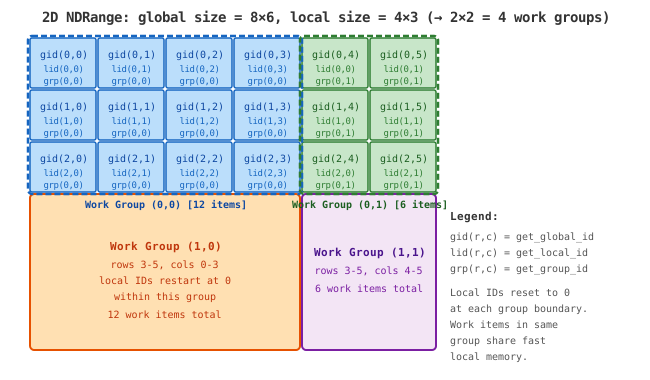
Built-in ID functions (available inside every kernel):
| Function | Returns | Example (2D, row=2, col=5, group 4×3) |
|---|---|---|
get_global_id(dim) | Unique index across all work items | get_global_id(0) → 2 |
get_local_id(dim) | Index within the current work group | get_local_id(0) → 2 % 4 = 2 |
get_group_id(dim) | Index of the current work group | get_group_id(0) → 2 / 4 = 0 |
get_global_size(dim) | Total work items in this dimension | — |
get_local_size(dim) | Work items per group in this dimension | — |
get_num_groups(dim) | Number of work groups | — |
3.4 The Memory Model
OpenCL defines four memory spaces, each with different speed and visibility:
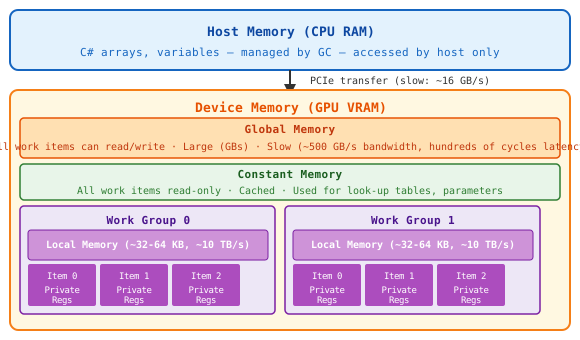
| Memory | Keyword | Scope | Speed | Size |
|---|---|---|---|---|
| Global | __global | All work items | Slow (hundreds of cycles) | GBs |
| Constant | __constant | All work items (read-only) | Fast (cached) | ~64 KB |
| Local | __local | One work group | Very fast (~10 TB/s) | ~32–64 KB |
| Private | __private (default) | One work item | Fastest (registers) | ~few KB |
Key insight: Reading from global memory is the main performance bottleneck in GPU programming. Moving data into local memory and reusing it is the primary optimisation technique (demonstrated in Sample 06).
3.5 OpenCL C — The Kernel Language
Kernels are written in OpenCL C, which is a subset of C99 with GPU-specific extensions.
What you get in OpenCL C
// Address space qualifiers on pointers
__kernel void my_kernel(
    __global const float* input,   // reads from global memory
    __global       float* output,  // writes to global memory
    __local        float* scratch, // shared within work group
    int n)                         // scalar passed by value
{
    int gid = get_global_id(0);    // built-in: this item's global index
    int lid = get_local_id(0);     // built-in: this item's local index
    int grp = get_group_id(0);     // built-in: this item's group index

    // Load into local memory
    scratch[lid] = input[gid];
    barrier(CLK_LOCAL_MEM_FENCE);  // wait: all items must finish writing

    // Use local memory (fast)
    output[gid] = scratch[lid] * 2.0f;
}
What’s missing compared to C#
| C# / C++ feature | Available in OpenCL C? |
|---|---|
| Classes, structs | ❌ No structs with methods, no classes |
Dynamic memory (new, malloc) | ❌ No heap allocation in kernels |
| Recursion | ❌ Not supported |
| Function pointers | ❌ Not supported |
| STL / standard library | ❌ No |
printf for debugging | ✅ Available as an extension |
Vector types (float4, int2) | ✅ Yes, built-in |
Math functions (sqrt, sin, …) | ✅ Yes, built-in |
| Bit-shift operators | ✅ Yes |
The __kernel qualifier
Only functions marked __kernel can be launched from the host. They must return void. All other functions are device-side helper functions.
Barriers
barrier(CLK_LOCAL_MEM_FENCE) is a synchronisation point within a work group:
- All work items in the group must reach the barrier before any can continue
- Ensures writes to local memory by some items are visible to all items
- Required whenever one item reads data written by another item in the same group
3.6 The Host-Side Pipeline
Every OpenCL program follows this sequence:
flowchart TD
    A["GetPlatformIDs<br>Find available OpenCL runtimes"] --> B
    B["GetDeviceIDs<br>Find GPU or CPU devices"] --> C
    C["CreateContext<br>Link host and device"] --> D
    D["CreateCommandQueue<br>Create channel to device"] --> E
    E["CreateProgramWithSource<br>Compile kernel from string"] --> F
    F["BuildProgram<br>JIT-compile for this device's hardware"] --> G
    G["CreateKernel<br>Get a callable handle to the kernel function"] --> H
    H["CreateBuffer<br>Allocate GPU-side memory"] --> I
    I["CopyHostPtr / EnqueueWriteBuffer<br>Upload data to GPU"] --> J
    J["SetKernelArg<br>Bind buffers and scalars as kernel parameters"] --> K
    K["EnqueueNDRangeKernel<br>Launch N work items"] --> L
    L["Finish<br>Wait for GPU to complete"] --> M
    M["EnqueueReadBuffer<br>Download result to CPU"] --> N
    N["Release*<br>Free all OpenCL objects"]

    style A fill:#E3F2FD
    style B fill:#E3F2FD
    style C fill:#BBDEFB
    style D fill:#BBDEFB
    style E fill:#C8E6C9
    style F fill:#C8E6C9
    style G fill:#C8E6C9
    style H fill:#FFE0B2
    style I fill:#FFE0B2
    style J fill:#FFF9C4
    style K fill:#EF9A9A,color:#fff
    style L fill:#EF9A9A,color:#fff
    style M fill:#FFE0B2
    style N fill:#E0E0E0
This pipeline is implemented explicitly in every sample. Once you have seen it in Sample 02, the later samples only show the parts that change.
3.7 Key Rules to Remember
-
Global size must be a multiple of local size. Round up if needed:
int globalSize = ((N + localSize - 1) / localSize) * localSize;And guard against out-of-bounds in the kernel:
if (gid >= n) return; -
Kernels are compiled at runtime from C strings. Compilation errors appear as runtime exceptions, not build errors.
-
Buffer handles (
nint) are 8 bytes on 64-bit systems. PassIntPtr.Sizeas the argument size toSetKernelArg. -
cl.Finish(queue)blocks the host until all commands in the queue complete. This is how we ensure the GPU is done before we read results back. -
Every object has a
Release*function. OpenCL uses reference counting. Always release objects you create (context, queue, buffers, kernel, program).